Fellow AI review 2025 tackles a simple question: can this AI meeting assistant bring notes, transcripts, and follow-ups into one clean workflow for US teams?
Fellow markets itself as an AI note taker with recording, transcription, and summaries that sit right beside your calendar events. Prep, capture, and follow-ups live together. For managers drowning in agendas, action items, and scattered tools, that promise is appealing.
Ever jump between a doc, a call recording, and a chat thread after a weekly sync? This aims to stop that.
What is Fellow
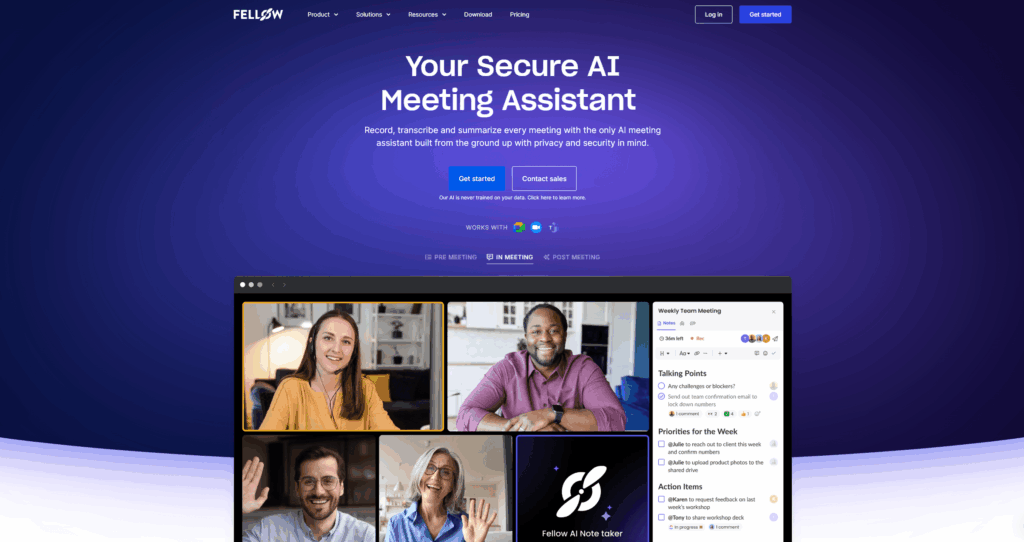
Fellow is a meeting workflow platform built around AI note taking, recording, and transcription for Google Meet, Zoom, and Microsoft Teams. It covers prep, live capture, and post-call recaps, then keeps decisions and tasks searchable across meetings. It serves individuals up to large enterprises.
Fellow also stresses accuracy and data safety. It says its AI is not trained on your content and highlights SOC 2 Type II, SSO/MFA, and third-party testing. For ops and IT, these are must-haves.
Key Features
AI note taker, recording, and transcription

Fellow records meetings, produces transcripts, and auto-creates AI summaries with action items. It supports the major platforms and lists many languages. In practice, this cuts the time from call to recap and reduces context lost between meetings.
During discovery calls with fast back-and-forth, summaries stayed coherent and task capture was quick. Still, teams with strict compliance rules should confirm retention settings and workspace access before rollout.
Need in-call coaching rather than passive capture? Proactor can sit alongside, offering real-time suggestions and next steps, then handing off to your CRM when the call ends.
Meeting agendas and templates
Fellow’s roots are collaborative agendas and reusable templates for 1-on-1s, weekly standups, and project rituals. Pre-meeting nudges and reminders help teams arrive prepared and on time. Good habits start before anyone hits record.
In use, templates trimmed setup time for recurring leadership huddles. The trade-off: the whole team must adopt the habit. If only a few prep agendas, results will be uneven.
If your runbooks live in Notion or Confluence, integrations help you avoid double entry while keeping source docs aligned.
Action items and follow-ups

Action items are first-class. You can assign owners and due dates on the fly, and tasks resurface in later notes so decisions don’t vanish. For busy leaders, this is where value shows up.
On heavy weeks, automated recaps were useful nudges. The human step remains: confirm and prune tasks so they mirror reality, not just AI guesses.
Want cross-meeting momentum with proactive reminders and a running insight stream? Proactor adds real-time guidance and a persistent to-do that carries context into your next conversation.
Integrations and workflows
Fellow connects to Google Meet, Zoom, and Teams for capture and plugs into Slack plus a range of project and CRM tools. The Teams integration lets you post directly into meeting notes and handle feedback from chat. Work stays in the tools people already use.
In testing, Slack and Teams hooks cut down copy-paste time. For sales and CS, advanced CRM integrations and recap templates bring pipeline context into summaries. That reduces manual re-entry.
Multi-language and governance features
Transcription coverage spans many languages, and enterprise controls such as SSO, provisioning, and domain control show up on higher tiers. The “we don’t train on your data” stance is simple and reassuring.
Language breadth is strong, but accuracy still depends on audio quality and accents. Pilot with real calls before global deployment.
Analytics and meeting policy
Beyond capture, Fellow adds analytics and gentle policy nudges such as timers and meeting cost estimates. Leaders can track time spent and reinforce basics like agendas and attendee counts. Not flashy, but useful for behavior change at scale.
Analytics helped spotlight the heaviest weeks during quarterly reviews. As always, insights improve as adoption rises. Partial rollouts dilute returns.
Pricing

Fellow’s lineup is simple. Free gets you started. Team fits small groups. Business adds org-wide capabilities and CRM integrations. Enterprise layers advanced admin and security controls. Seat caps and AI quotas vary by plan.
| Plan | Price (annual) | Key limits | Notes |
|---|---|---|---|
| Free | $0 | Up to 5 seats; 10 AI notes + 10 recordings (lifetime) | Meet/Zoom/Teams plus Slack integrations |
| Team | $7/user/mo | Up to 20 seats; 10 AI notes/user + 10 recordings/user | Adds automations and project tool integrations |
| Business | $15/user/mo | Up to 50 seats; unlimited AI notes and recordings | Adds CRM integrations, org templates, bot customization |
| Enterprise | $25/user/mo | Unlimited seats; unlimited AI; advanced controls | Starts at 10 users; domain control, provisioning, analytics |
Details such as language coverage, upload quotas, and legal reviews appear on the plan matrix. Monthly billing exists at higher rates. Always confirm current limits before purchase.
Security & Privacy
Public materials reference SOC 2 Type II, SSO/MFA, and annual third-party testing. The company also states it does not train models on your content. For security reviews, request the latest attestation, validate retention defaults, and test SSO and provisioning during a pilot.
The takeaway: align retention and access with policy, and verify who can view recordings and transcripts across workspaces.
Pros & Cons
Pros
- Faster discovery-to-recap: transcript and summary sit with the agenda, so nothing scatters.
- Clean handoffs: action items roll into the next call; fewer dropped follow-ups.
- CRM-friendly: recap templates and integrations cut copy-paste after demos and QBRs.
- Onboarding boost: templates standardize talk tracks for new SDRs/AEs.
- Meeting hygiene: pre-reads and time-boxing keep deal reviews focused.
Cons
- Coaching gap: limited live guidance during objections or pricing talks.
- Adoption tax: value fades if managers don’t enforce agenda/notes habits.
- Quotas: Free/Team limits can throttle heavy demo schedules.
- Analytics need broad usage; partial rollouts underwhelm.
- Security paperwork may trail procurement calendars; request the latest letter.
Limitations
Fellow is excellent at capture, summaries, and structured note taking. It’s not designed for deep, in-the-moment coaching. If you need live playbooks, objection handling, or real-time prompts during calls, pair it with a copilot that focuses on proactive guidance. Proactor is built for that layer.
Highly specialized workflows may face process friction rather than product gaps. Plan onboarding, set template governance, and assign a clear owner for cross-meeting action items.
Who Should Use It
Fellow suits managers, sales and CS teams, and operations leads who want an AI meeting assistant that ties agendas to action items and meeting summaries. Teams with standard rituals—1-on-1s, retros, QBRs—see quick wins because templates and recaps shine early.
If you record only a handful of calls weekly, Team hits a sweet spot. Larger orgs with strict admin rules and CRM-centric workflows should look at Business or Enterprise. Pilot with representative calls before rolling out widely.
Final Verdict
Fellow is a strong AI meeting assistant that unifies transcription, AI summaries, and action items while keeping agendas front and center. The magic shows up when a whole team adopts templates and recaps. That’s when searchability, accountability, and analytics compound.
Want real-time coaching alongside reliable capture? Pair Fellow with Proactor. Together, they cover actionable guidance during the call and accurate meeting records after it.
FAQ
-
Does Fellow have a free plan?
Yes. The Free plan supports up to five seats with lifetime quotas for AI notes and recordings. It’s a low-risk way to test workflows before moving to Team or Business.
-
How many languages does Fellow support for transcription?
It advertises coverage across many languages with strong accuracy on supported platforms. Always test with your audio conditions before committing.
-
Is Fellow secure enough for enterprise use?
Available materials note SOC 2 Type II, SSO/MFA, and annual testing. For procurement, request current report dates and DPAs as part of your review.
-
What’s the difference between Fellow and a copilot like Proactor?
Fellow excels at meeting transcription, AI summaries, and structured note taking tied to agendas and action items. Proactor focuses on proactive, real-time suggestions and an insight stream that turns live conversations into the next steps across your sales cycle.
-
Can I use Fellow and Proactor together?
Yes. Many teams pair a capture tool with a proactive copilot. Fellow anchors meeting records; Proactor adds live guidance and post-call momentum into tasks and CRM updates.