In today’s fast-moving work environment, Teams meetings have become the heartbeat of collaboration — but turning those conversations into clear, usable outcomes is still a challenge.
That’s where AI meeting notes tools come in.
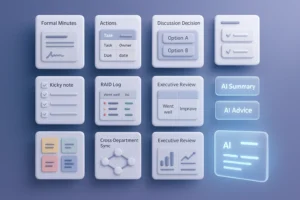
Instead of relying on manual note-taking or post-meeting guesswork, modern AI tools can now transcribe meetings in real time, summarize key points, extract action items, and even suggest what your team should do next.
In this article, we’ve handpicked the 7 best AI notes tools for Teams meetings in 2025, covering everything from basic transcription to advanced real-time AI advice. Whether you’re a manager, team lead, or part of a remote-first company, these tools can help your team save time, stay aligned, and move faster — during and after every meeting.
🟣 Looking for more than just a transcript? These tools help you turn every meeting into momentum.
TL;DR – Top AI Note Takers for Teams at a Glance
| Tool | Best For | Real-Time Summary | Live AI Advice | Teams Support | Offline Use | Free Plan | What Makes It Stand Out |
|---|---|---|---|---|---|---|---|
| 🔥 Proactor | Teams that want insights, not just notes | ✅ Yes – with instant takeaways | ✅ Yes – only tool with live AI Advice | ✅ Yes | ✅ Yes | ✅ Yes | The only AI that listens, understands, and suggests actions in real time |
| Otter.ai | Simple transcription & note sharing | ✅ Yes | ❌ No | ✅ Yes | ❌ No | ✅ Yes | Easy-to-use transcription with keyword tagging |
| Fireflies.ai | CRM-heavy sales workflows | ✅ Yes | ❌ No | ✅ Yes | ❌ No | ✅ Yes | Syncs notes & follow-ups with your CRM |
| Fathom | Instant highlights & recap sharing | ✅ Yes | ❌ No | ✅ Yes | ❌ No | ✅ Yes | One-click highlight capture, no setup needed |
| Avoma | Sales performance & coaching insights | ✅ Yes | ❌ No | ✅ Yes | ❌ No | ❌ No | Advanced analytics & call coaching for sales teams |
| Notta | Multilingual or international meetings | ✅ Yes | ❌ No | ✅ Yes | ✅ Yes | ✅ Yes | Accurate transcription in 40+ languages |
| Supernormal | Quick post-meeting email follow-ups | ✅ Yes | ❌ No | ❌ No | ❌ No | ✅ Yes | Automatically writes follow-up emails after each meeting |
What Makes a Great AI Notes Tool for Teams?
Before diving in, let’s talk about what matters most when choosing an AI note taker for teams:
- Microsoft Teams support: Seamless integration is key for meeting continuity.
- Real-time transcription: The tool should capture everything as it happens — no delays.
- Task and decision tracking: Look for tools that generate action items automatically.
- Team collaboration: Shared access, tagging, and editing make execution easier.
- Data privacy: Ensure tools are compliant with GDPR or enterprise-level security standards.
1. Proactor — Best for Real-Time Insights & Action Plans
Best for: Teams that want real-time meeting intelligence — not just notes. Especially useful for product managers, sales teams, and decision-heavy meetings on Microsoft Teams, Zoom, or Google Meet.
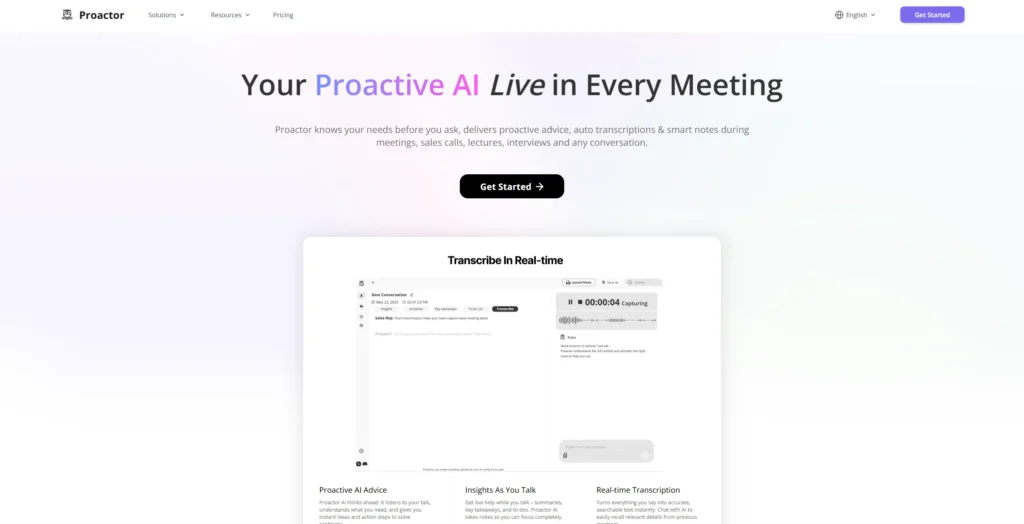
If your meetings often end with vague notes or forgotten action items, Proactor changes the game. It acts as your proactive AI teammate — working quietly in the background, understanding what’s being said, and instantly turning it into something you can actually use.
Here’s what Proactor can do for you:
- Real-time Key Takeaways: As you speak, Proactor captures highlights and turns them into actionable bullet points
➤ so you and your team can stay aligned without needing to take notes yourself. - AI-Generated Advice with Context: Proactor doesn’t just say what to do, it explains why
➤ so you can make confident decisions without digging through transcripts. - Smart To-do Lists: It pulls tasks directly from your meeting and assigns ownership
➤ saving you time and helping your team stay accountable. - Meeting Wiki Generator: Proactor organizes your meetings into structured summaries (Overview, Decisions, Tasks, etc.)
➤ so you can quickly share outcomes without rewriting anything. - Potor, Your Memory Assistant: Forgot what someone said last week? Just ask.
➤ Potor helps you recall key details across meetings, so nothing important gets lost. - No Join Bots Needed: Proactor records discreetly and works with any platform
➤ giving you flexibility without interruptions or awkward pop-ups. - Multi-language Support: English, French, German, Chinese, and more
➤ so your international teams stay on the same page without translation headaches.
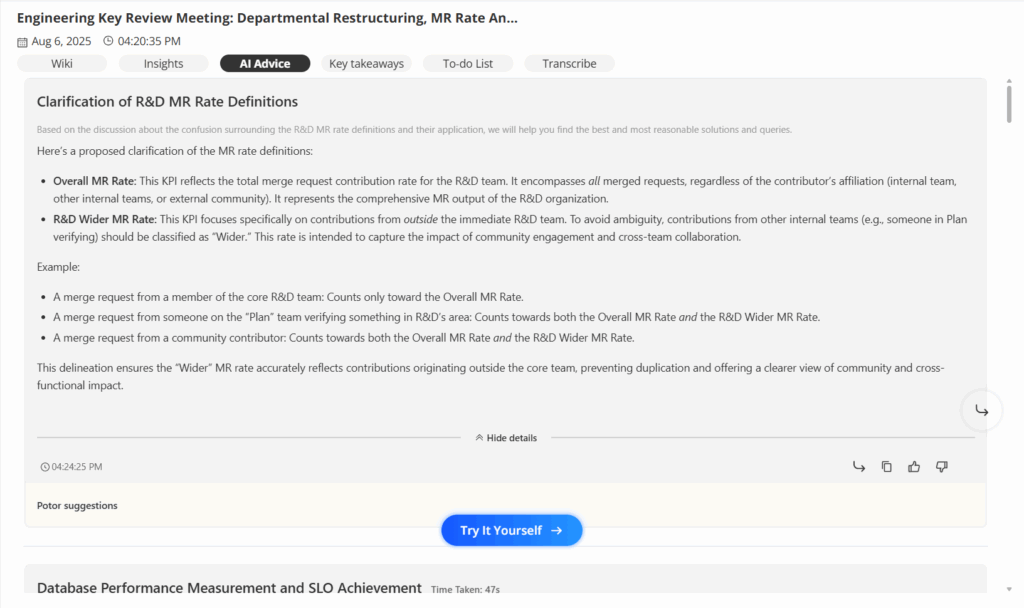
Whether you’re leading a strategy call, running a client demo, or reviewing progress with your team, Proactor helps you work smarter — not harder. It gives you clarity during meetings, and confidence after.
Why you’ll love it:
- It thinks ahead for you.
- It organizes your chaos into action.
- It remembers so you don’t have to.
- And it starts free — no credit card needed.
If you want fewer meetings and faster execution, Proactor is built for the way you work.
Proactor Pricing
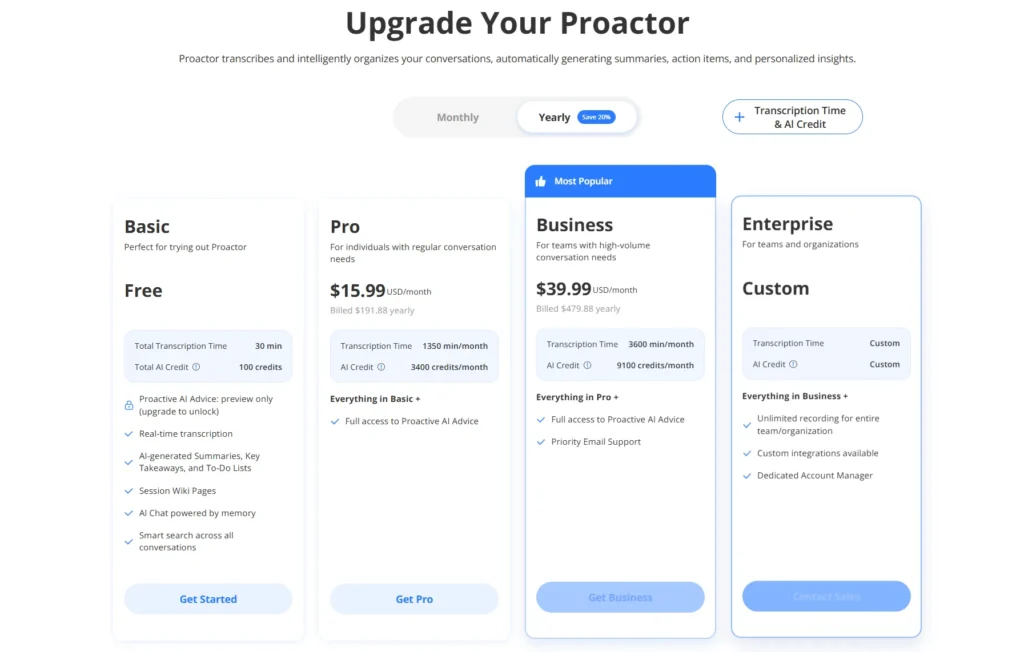
Basic: (Free)
- Quota
- Total Transcription Time: 30 minutes
- Total AI Credits: 100 credits
- Features Included:
- Real-time transcription
- AI-generated Summaries, Key Takeaways, and To-Do Lists
- Session Wiki Pages
- AI Chat powered by memory
- Smart search across all conversations
Pro: ($15.99/month)
- Quota
- Total Transcription Time: 1,350 minutes/month
- Total AI Credits: 3,400 credits/month
- Features Included:
- Real-time transcription
- AI-generated Summaries, Key Takeaways, and To-Do Lists
- Session Wiki Pages
- AI Chat powered by memory
- Smart search across all conversations
Business: ($39.99/month)
- Quota
- Total Transcription Time: 3600 minutes/month
- Total AI Credit: 9100 credits/month
- Features Included:
- Real-time transcription
- AI-generated Summaries, Key Takeaways, and To-Do Lists
- Session Wiki Pages
- Al Chat powered by memory
- Smart search across all conversations
- Full access to Proactive AI Advice
- Priority Email Support
Enterprise: (Custom)
- Quota
- Total Transcription Time: Custom
- Total AI Credit: Custom
- Features Included
- Real-time transcription
- AI-generated Summaries, Key Takeaways, and To-Do Lists
- Session Wiki Pages
- Al Chat powered by memory
- Smart search across all conversations
- Full access to Proactive AI Advice
- Priority Email Support
- Unlimited recording for entire team/organization
- Custom integration available
- Dedicated Account Manager
2. Otter.ai — Best for Simplicity & Transcription
Otter is one of the most widely recognized AI transcription tools. It’s known for its clean UI and practical use. It automatically records and transcribes meeting content, adds keywords, and generates summaries — a solid choice for teams that just need accurate transcripts.
Best For:
Small teams, educators, and students looking for simple meeting capture and fast note sharing.
Key Features:
- Real-time transcription for Teams, Zoom, Meet
- Speaker identification and keyword tagging
- Collaborative note editing and sharing
- Calendar sync for auto-record
- Browser extension and mobile support
Pricing:
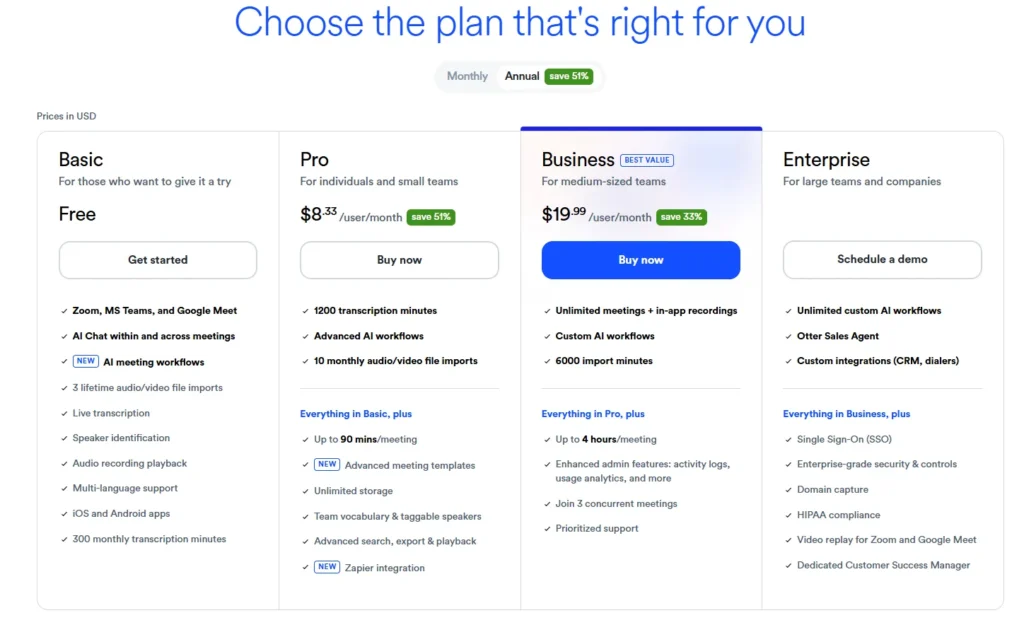
- Free: 600 min/month
- Pro: $8.33/month
- Business: $20+/month with admin dashboard and team tools
Pros:
- Beginner-friendly UI
- Integrates with major meeting platforms
- Free plan sufficient for light use
Cons:
- No AI-generated advice or task recognition
- Summary quality depends on clear speech
- Output is mostly raw transcript + light summary
3. Fireflies.ai — Best for CRM Integration
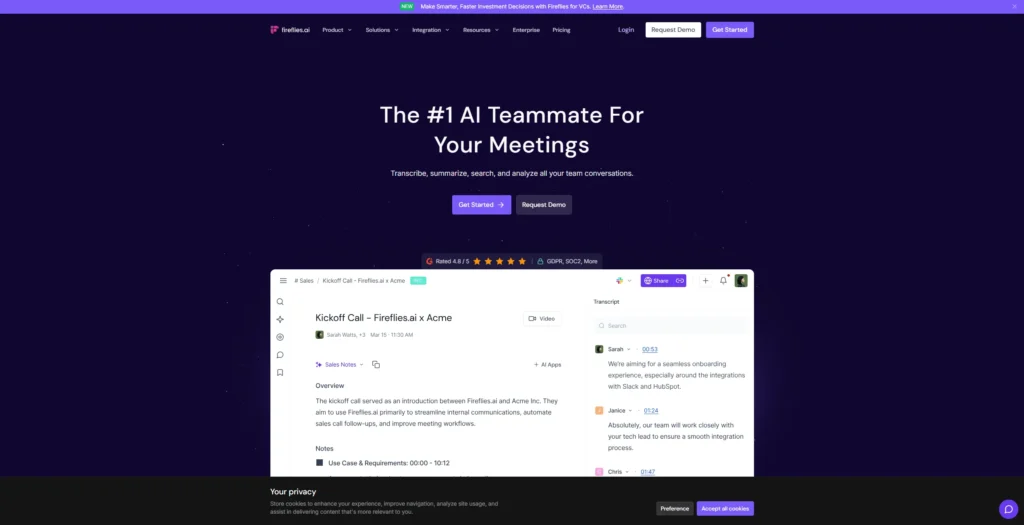
Fireflies focuses on the sales use case. It shines when paired with CRMs like Salesforce or HubSpot, logging conversations and auto-syncing summaries and follow-ups to your sales pipeline.
Best For:
Sales reps, customer success managers, or any team doing client-facing calls.
Key Features:
- Real-time transcription and summaries
- Auto-capture of action items and decisions
- CRM sync (Salesforce, HubSpot, etc.)
- Full-text meeting search with keyword filtering
- Speaker analytics and time tracking
Pricing:
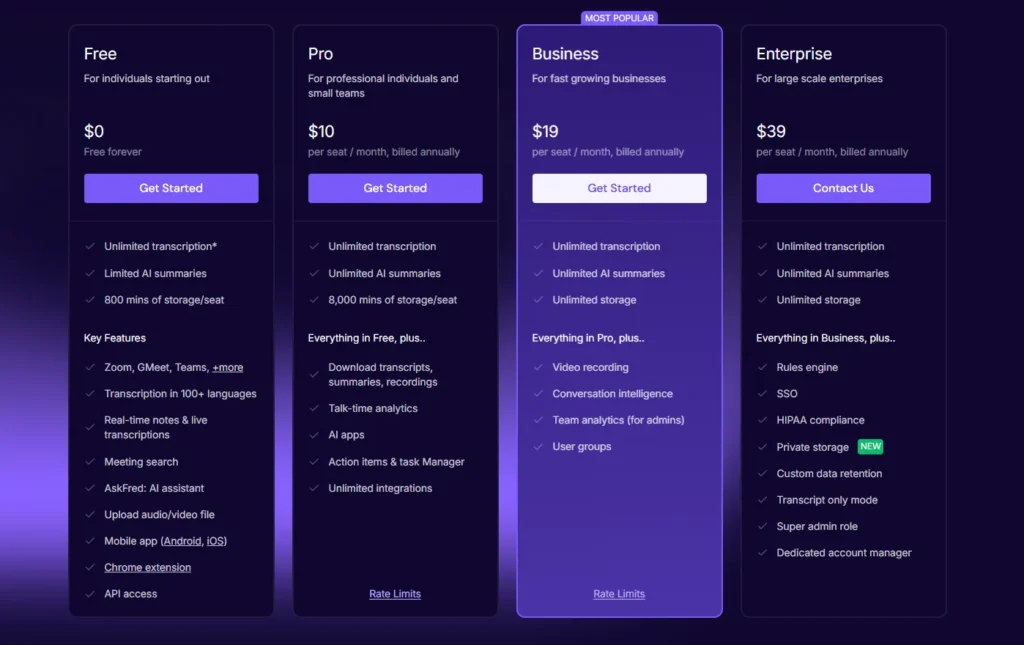
- Free: Up to 800 transcription minutes/month
- Pro: $10/month
- Business: $19+/month with CRM integrations
Pros:
- Built-in CRM sync saves tons of manual entry
- Great searchability across conversations
- Strong focus on follow-ups
Cons:
- Interface is busy; takes time to get used to
- Overkill for general meetings outside sales
- Limited language support
4. Fathom — Best for Instant Highlight Capture
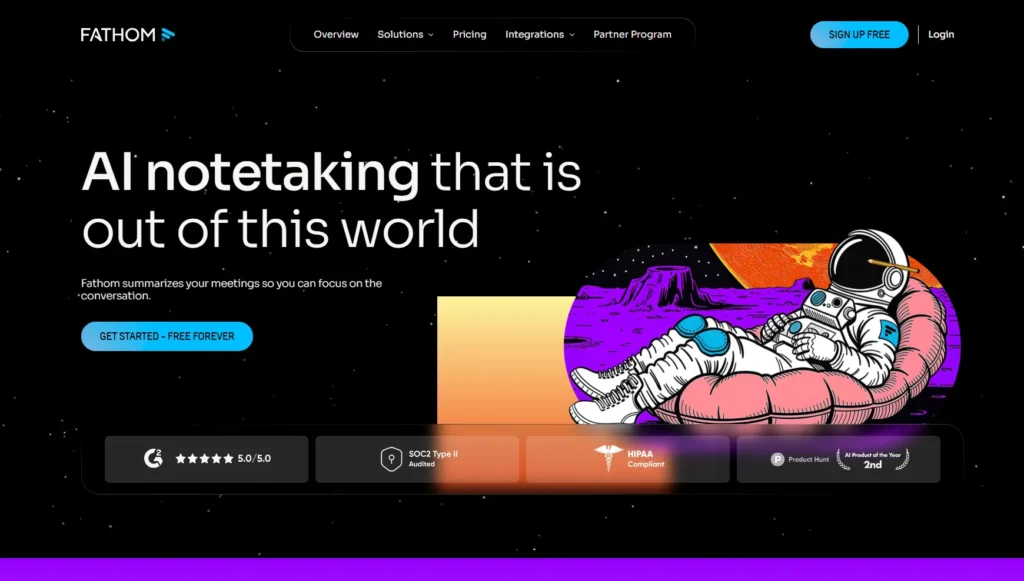
Fathom specializes in one-click highlights and fast recaps. During meetings, you can instantly capture key moments and get a shareable summary minutes after the call ends.
Best For:
Coaches, consultants, creatives — anyone who wants to highlight important moments on the fly.
Key Features:
- One-click highlight capture during meetings
- Real-time transcription + auto-summary
- Shareable meeting summaries
- Integration with Zoom and Teams (bot-free)
- Easy editing and playback of recorded sections
Pricing:
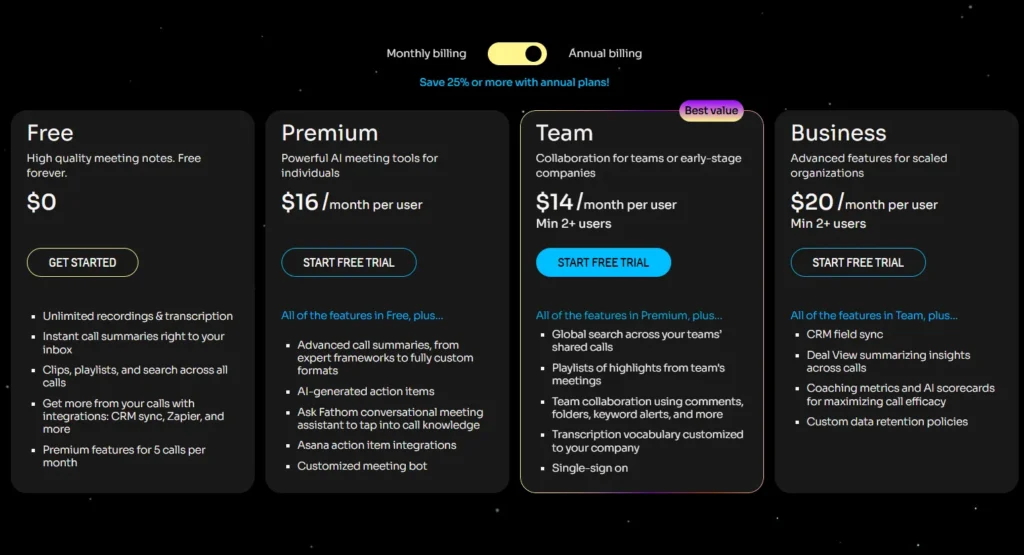
- Free plan includes most core features
- Paid tiers for advanced collaboration (TBD)
Pros:
- Extremely fast for capturing and sharing key takeaways
- Easy onboarding and lightweight UI
- Great for client calls or short feedback meetings
Cons:
- No structured output like wikis or task boards
- No action item generation or AI decision support
- Weak contextual memory
5. Avoma — Best for Sales Intelligence
Avoma goes far beyond notes — it brings coaching analytics into the mix. You get meeting analysis, talk-time breakdowns, and performance insights, all tailored for sales improvement.
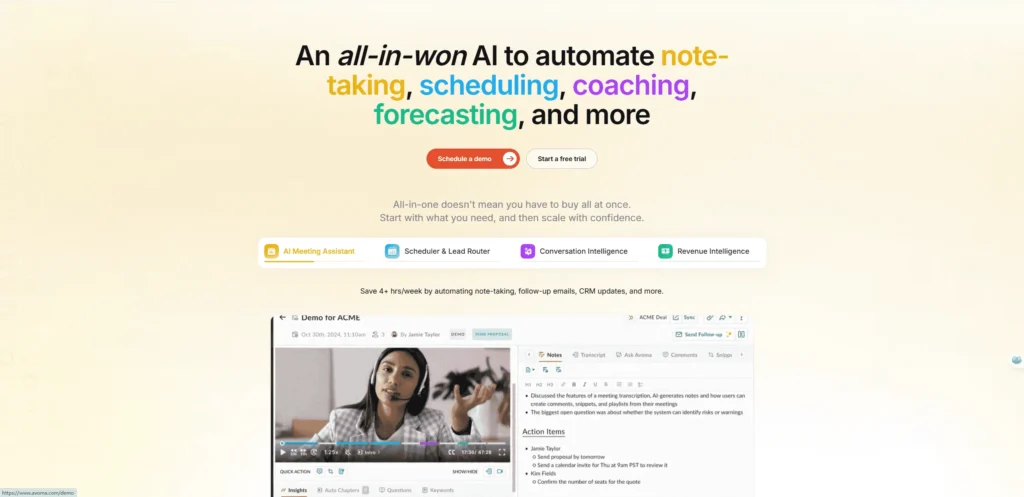
Best For:
Mid-to-large sales teams, team leads, and customer success managers.
Key Features:
- Real-time transcription and summaries
- Conversation metrics (interruptions, sentiment, talk ratio)
- Deal tracking and follow-up alerts
- Customizable templates for various meeting types
- Scorecards and sales coaching insights
Pricing:
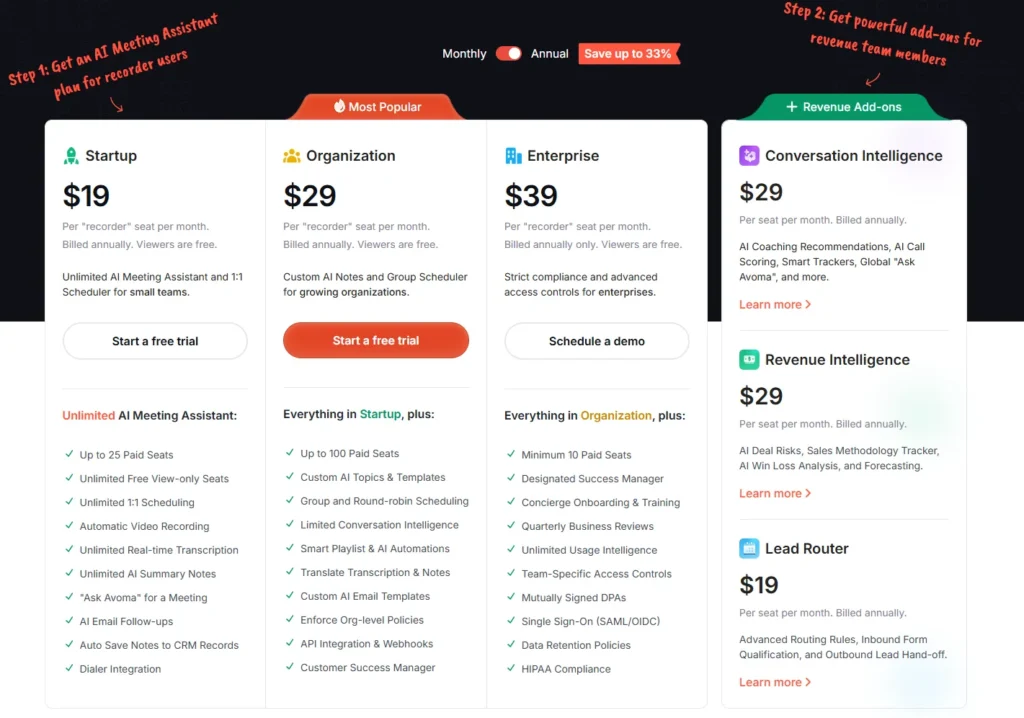
- Starts at ~$19/month
- Enterprise plans with API access and role permissions
Pros:
- Rich analytics to improve sales performance
- Automated coaching workflows
- Scalable across departments
Cons:
- Steep learning curve
- Expensive for small teams
- Less useful for non-sales use cases
6. Notta — Best for Multilingual Transcription
Notta leads in multilingual capabilities. It’s built for global teams and supports over 40 languages with strong voice recognition and translation features.
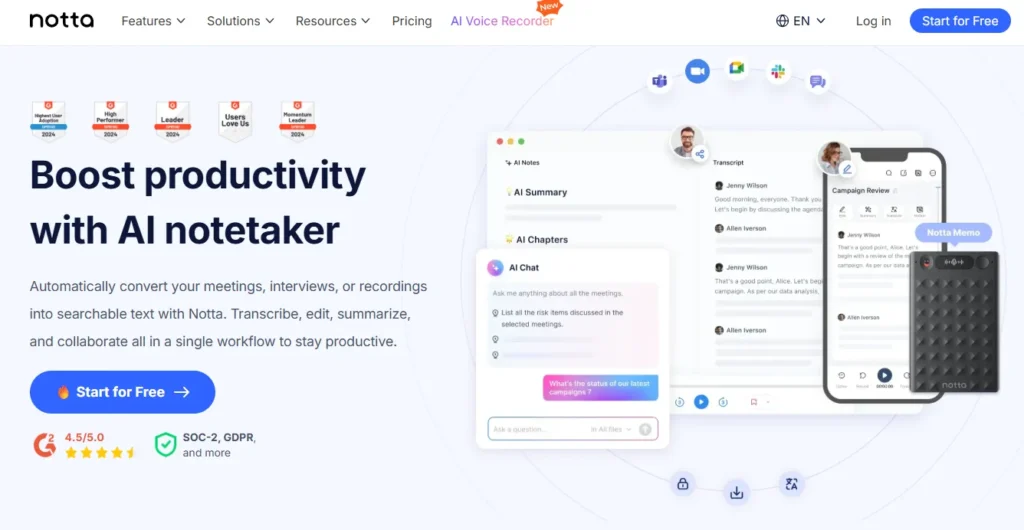
Best For:
International companies, localization teams, global education institutions
Key Features:
- Transcription in 40+ languages
- Live captions and subtitle generation
- Upload and convert audio files
- Export formats: PDF, TXT, SRT
- Optional translation into other languages
Pricing:
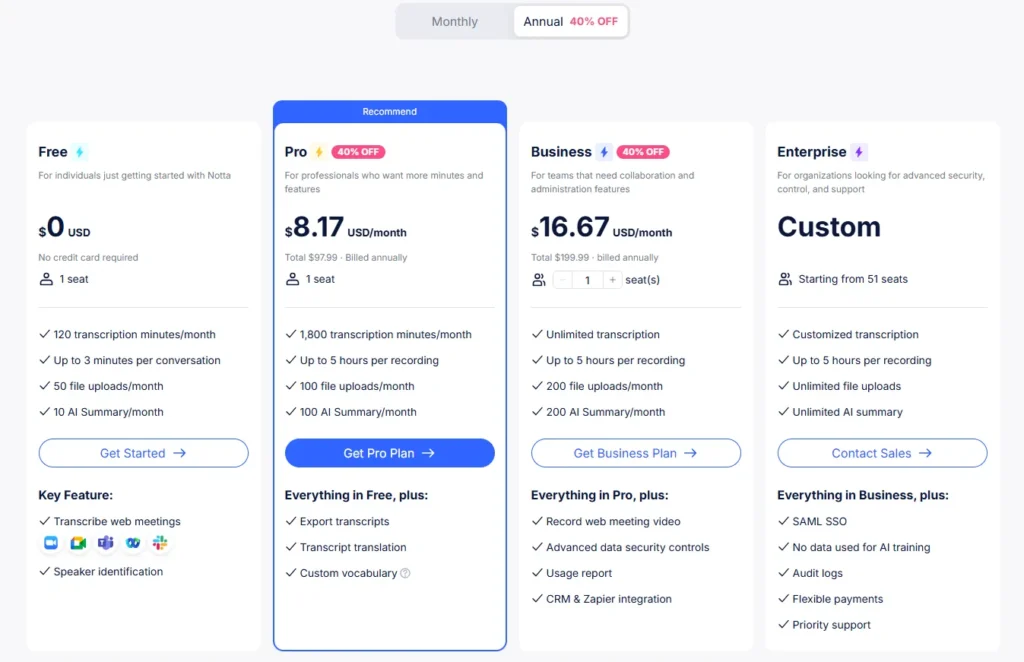
- Free trial available
- Pro: From $8.17/month
- Business plans support multi-user teams
Pros:
- Exceptional for multilingual teams
- Strong audio file processing
- Versatile export formats
Cons:
- No task or decision extraction
- No cross-meeting memory or AI follow-up
- More of a transcription tool than a productivity assistant
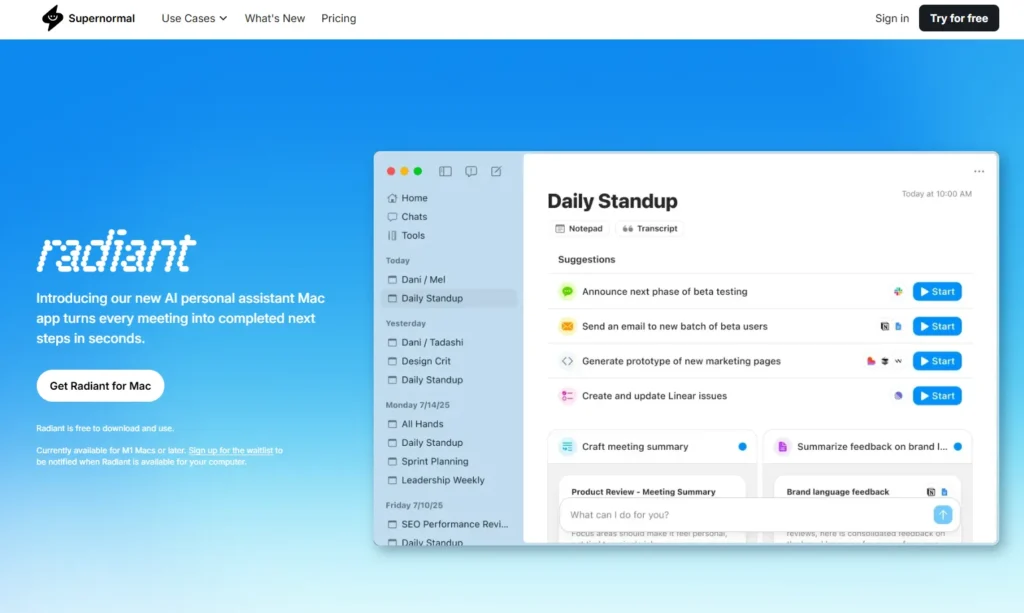
7. Supernormal — Best for Email Follow-Ups
Supernormal focuses on one thing: writing your follow-up emails after every meeting. It transcribes the call and sends you a ready-to-send email draft — instantly.
Best For:
Executives, managers, and client-facing roles who need to follow up fast.
Key Features:
- Instant meeting transcription
- AI-generated meeting recap + follow-up email
- Integrates with Google Calendar & Gmail
- Customizable tone and templates
- No bots needed to join the call
Pricing:
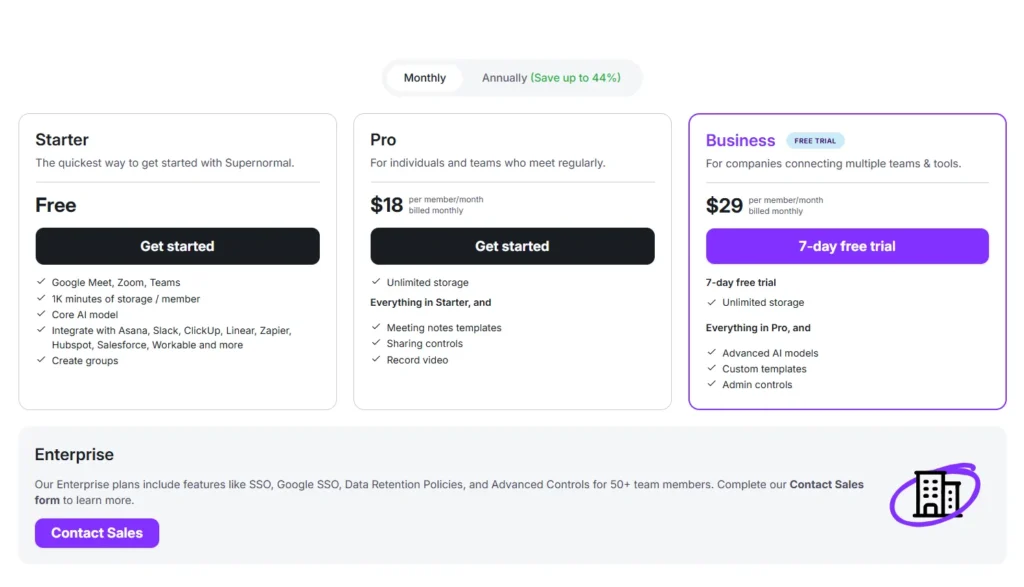
- Free plan available
- Pro: Starts at $18/month
- Enterprise: Custom pricing for teams
Pros:
- Saves tons of post-meeting email time
- Easy integration with Google ecosystem
- Well-written, concise summaries
Cons:
- No Microsoft Teams support
- Lacks action items or task boards
- English-first — not ideal for non-native speakers
How to Choose the Right Tool for Your Team
Not every team needs the same kind of meeting assistant. To pick the right one, start with your team’s real pain points and match them to what each tool actually solves.
Here’s a quick checklist to guide your choice:
| Ask Yourself | What to Look For | Best Match |
|---|---|---|
| Do we need real-time clarity during live meetings? | Live summaries, proactive suggestions | ✅ Proactor |
| Do we have in-person or offline sessions we need to capture? | Audio upload, flexible input methods | ✅ Proactor |
| Are we using Microsoft Teams, Zoom, or Meet? | Cross-platform support | ✅ Proactor, Otter |
| Do we need clean transcripts and quick sharing? | Fast export formats, summaries | Otter, Fathom |
| Do we work across multiple languages? | Multilingual transcription & translation | Notta |
| Are we sales-focused and need CRM tools? | CRM sync, sales analytics | Fireflies, Avoma |
| Do we want automatic follow-up emails? | Email drafting features | Supernormal |
Whether you’re on a video call or recording a live session in person, Proactor works both ways. It transcribes, summarizes, and structures uploaded audio, just like it does for Zoom or Teams meetings.
Most tools only work online — Proactor works wherever you speak.
Why We Recommend Proactor in 2025
We’ve tested dozens of tools — and very few offer both real-time intelligence and offline flexibility. That’s where Proactor stands out.
🔹 It Works Online & Offline
Whether you’re in a virtual meeting or recording a face-to-face client session, Proactor has you covered.
You can upload audio files from interviews, lectures, or sales calls — and get the same structured summary, AI suggestions, and action items you’d get from a live call.
🔹 It’s Proactive, Not Passive
Instead of waiting for keywords or prompts, Proactor listens, understands your intent, and offers summaries and action plans — right as the conversation happens.
🔹 It Understands the Bigger Picture
Thanks to cross-session memory, Proactor connects what’s happening today with what happened last week — so your team always has full context.
🔹 It Keeps Things Simple
No bots. No complex integrations. No switching platforms. Just smart meeting intelligence that works — wherever your work happens.
Proactor helps you stay productive across both online meetings and offline conversations — because real work doesn’t only happen on Zoom.
FAQs
Which AI meeting notes tool works best with Microsoft Teams?
However, Proactor offers the most complete experience — it not only transcribes Teams meetings in real time, but also gives you structured takeaways, task lists, and proactive AI suggestions.
No bots required, and no disruption to your workflow.
🟣 Bonus: Proactor integrates seamlessly with Google Calendar too — perfect for mixed-platform teams.
Can I use Proactor for in-person or offline meetings?
You can record any conversation — a team huddle, lecture, sales visit — and upload the audio. Proactor will transcribe it, extract tasks, generate key takeaways, and even offer smart advice.
✅ Whether you’re on Zoom or recording from your phone, Proactor has you covered.
Is Proactor free to use?
You’ll get access to real-time summaries, to-do lists, memory-based search, and even preview AI-generated advice — no credit card required.
🟢 Start with the free plan, and upgrade only if your team needs more power or minutes.
Can I use multiple AI tools together, like Otter + Proactor?
But honestly, Proactor is built to replace multiple tools, so you don’t have to juggle between apps. It gives you notes, insights, structure, and memory — all in one place.
🔄 Less switching = more focus and better execution.
Does Proactor support multiple languages?
It automatically adapts to the language spoken in the meeting, giving your international teams accurate, high-quality results.
🌍 Perfect for global teams or multilingual interviews.