Meetings are essential for collaboration, but taking notes manually often means missing key details or spending hours organizing them later.
With Proactor AI, your smart AI meeting note taker, you can capture every conversation in real time, highlight decisions, and track action items automatically.
Instead of juggling typing and listening, you stay fully present while Proactor turns your meetings into organized, actionable insights—making every discussion easier to review and act on.
Why Manual Note-Taking is Holding Your Team Back
Manual note-taking is a distraction. When you’re focused on typing, you’re not fully present in the discussion. Common pitfalls include:
- Information Gaps: Missing key details while multitasking.
- Context Loss: Struggling to remember who said what in a multi-person brainstorm.
- Wasted Time: Spending hours after the call re-listening to recordings to find one specific quote.
An AI meeting assistant like Proactor AI eliminates these bottlenecks by providing real-time transcription, speaker identification, and instant summaries.
What is Proactor AI?
Proactor AI is more than a recorder—it’s a proactive meeting assistant that turns conversations into actionable outcomes.
It combines live transcription with intelligent summaries, so key points and next steps are captured automatically.
Core Capabilities
- Proactive Notes: Captures decisions and action items in real time.
- Live Transcription: Converts speech into accurate, timestamped text.
- Instant Summaries: Highlights key points and to-dos automatically.
- Meeting Integration: Works seamlessly with Zoom, Teams, and Google Meet.
👉 Proactor AI Review 2026: Best Features, Security, Pricing & Benefits

5 Steps to Perfect Meeting Notes with Proactor AI
1. Sync Your Calendar
Connect Proactor AI to your Google Calendar. It will remind you of upcoming meetings so you never miss recording a session.
2. Capture the Conversation
Start your meeting and let Proactor transcribe in real time. It distinguishes different speakers, creating a clear, easy-to-read transcript while you focus on the discussion.
3. Flag Important Moments
During the meeting, mark key points like decisions, deadlines, or action items. Proactor will prioritize these in the summary so you can quickly see what matters most.
4. Review the AI-Generated Summary
After the meeting, Proactor produces a structured, actionable summary, including:
-
Key Decisions: What was finalized
-
Action Items: Who is responsible and by when
-
Questions: Points needing follow-up
This summary is automatically organized, helping you act faster without digging through transcripts.
5. Share and Export
Share your notes via a link, with three options:
- Only me
- Anyone with the link
- Anyone with the link and password
You can also export your wiki as Markdown or PDF, making it easy to store, send, or integrate with your workflow.
Pro-Tips for High-Quality AI Notes
Maximize the power of Proactor AI by combining good habits with proactive features. Here’s how to get the best results:
1️⃣ Build Your Personal Knowledge Base
The more you use Proactor, the better it understands your workflow, goals, and context.
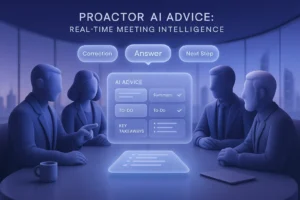
Over time, it creates a personal knowledge base and provides customized AI advice tailored to your meetings.
2️⃣ Ensure High-Quality Audio
Clear audio is key for accurate transcription. Choose a quiet environment, use a good microphone or headset, and minimize background noise.
The clearer the recording, the smarter Proactor’s insights.
3️⃣ Ask Potor Questions in Real Time
During meetings, don’t hesitate to ask Proactor’s AI assistant, Potor, questions.
All your questions and Potor’s answers are recorded automatically, making it easy to review and follow up later.
4️⃣ Tag and Contextualize Key Points
Flag important decisions, deadlines, or discussion highlights as they happen.
This helps Proactor prioritize and organize your notes in actionable summaries.
💡 Extra Tip: Regularly recording, tagging, and asking questions trains Proactor to become more proactive, delivering AI advice that’s smarter, faster, and truly personalized to your work style.
Taking perfect meeting notes shouldn’t be a full-time job. With Proactor AI, you move from being a passive note-taker to an active participant.
You save time, reduce human error, and create a searchable library of every decision your team makes.
Ready to make your meetings more productive?
Try Proactor AI for free today and experience the difference of automated, actionable insights.
Get Started